

11 mins read
 11 mins read
How to Pay Cable TV and Internet Bills Automatically in Nigeria
11 mins read
Paying for cable TV and internet services every month can become routine until you miss the payment date and suddenly lose access to your favourite channels or internet connection.
For many Nigerians, services such as DStv, GOtv, StarTimes, fibre internet, and other broadband subscriptions are part of everyday life.
The problem is not finding a way to pay because there are several ways to make these payments.
The challenge is remembering to pay on time every month.
Automatic bill payment solves this problem by allowing you to set up a payment schedule so your cable TV or internet bill can be paid automatically when it is due.
In this guide, you will learn how to pay cable TV and internet bills automatically in Nigeria, how automatic bill payments work, what you need before setting one up, and how to avoid failed payments.
What Is Automatic Bill Payment?
Automatic bill payment is a payment arrangement that allows a service provider or payment platform to process a bill according to a schedule you set.
Instead of remembering to make the same payment manually every month, you set the payment once.
For example, imagine that your DStv subscription needs to be renewed on the 15th of every month.
Instead of waiting until the 15th to open a payment app, select your package and complete the transaction, you can set up an automatic payment schedule.
When the scheduled date arrives, the payment is processed using the funding method you selected.
The same idea can be used for recurring internet subscriptions.
You can also read: Payment Automation: What It Is, How It Works and Its Benefits
How to Pay Cable TV Bills Automatically
1. Choose a payment platform that supports scheduled payments
First, use a payment service that supports automatic or scheduled bill payments.
Not every bill-payment platform offers the same features, so check whether the service allows you to schedule recurring payments rather than simply making one-time payments.
For example, Kwikpik allows users to schedule recurring bills and automatically make payments according to their chosen schedule.
2. Select your cable TV provider
Choose the cable TV service you want to pay for. Services such as:
(a) DStv
(b) GOtv
(c ) StarTimes
(d) Other supported TV subscription providers
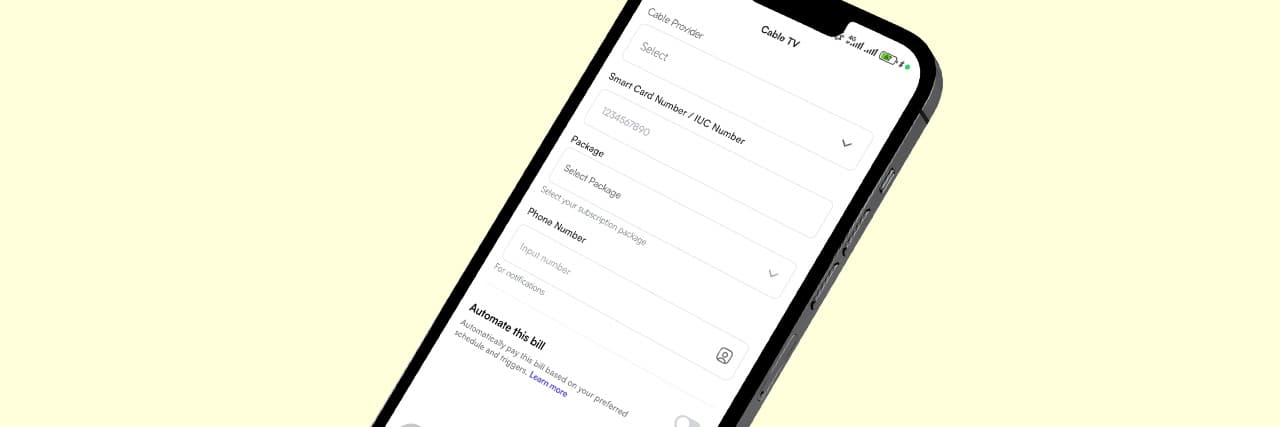
You will need your smartcard number or IUC number.
Make sure you enter the correct details because the payment needs to be linked to the correct subscription account.
3. Choose your subscription package
Select the TV package you want to maintain.
Your subscription amount will depend on the package you choose and any current pricing changes from the service provider.
It is important to check the amount before creating the recurring payment schedule because subscription prices can change.
4. Set the payment frequency
Choose how frequently the payment should occur.
For most cable TV subscriptions, this will normally be monthly.
Here at Kwikpik, we provide custom scheduling options; you may also be able to select a specific payment date.
For example:
You can select your preferred date or month, as well as the amount and the Cable TV you want to pay for.
5. Fund your payment wallet
Automatic payments only work when there is enough money available when the scheduled payment is due.
For example, if your subscription is ₦25,000 and your wallet contains only ₦10,000 on the payment date, the payment may fail.
Therefore, automatic payment does not completely remove the need to monitor your finances.
It mainly removes the need to manually initiate the same transaction every month.
6. Confirm the schedule
Review the details before activating the payment.
(i) Cable TV provider
(ii) Customer or smartcard number
(iii) Subscription package
(iv) Payment amount
(v) Payment frequency
(vi) Scheduled payment date
(vii) Funding source
Once everything is correct, activate the recurring payment.
How to Pay Internet Bills Automatically
1. Select your internet provider
Start by selecting the internet provider you use.
This could be a mobile data service, wireless broadband provider, fibre internet company, or another supported ISP.
2. Enter your details
Enter information such as your details associated with your internet account.
An example is your phone number.
3. Select your plan
Choose the internet package you want to renew.
For example, your plan could be a monthly package with a fixed amount.
If your provider changes its prices or plans, review your scheduled payment to make sure the amount still matches your subscription.
4. Set your payment schedule
Choose when you want the payment to happen.
If your internet provider expires your plan on a particular date, you may want to schedule the payment before the expiry date rather than waiting until the last minute.
5. Make sure your wallet has enough funds
This is one of the most important parts of automatic payments.
Before your scheduled payment date, make sure your wallet or selected funding source has enough money to cover the bill.
6. Activate the automatic payment
After checking your details, activate the schedule.
Your payment should then be processed automatically according to the schedule you created.
How to Automate Cable TV and Internet Bills With Kwikpik
1. Download the Kwikpik app from the Play Store or App Store.
2. Create an account or log in if you already have one.
3. Navigate to the Automations tab from the Home screen.
4. Click Create in the top-right corner of the Automation section.
5. Select Transfers from the options (Bill Payments, Transfers, Saving Goals).
6. Choose your transfer type from the pop-up menu: External Transfer, Internal Transfer, Bulk Transfer
7. Select your asset type (Fiat Currency or Cryptocurrency) if you chose External Transfer.
8. Enter the account number or beneficiary name.
9. Click on the user account details, input your transfer amount, and click Next.
10. Choose your preferred automation method:
(a) Frequency-based: Use this for recurring schedules. Select a frequency (daily, weekly, or monthly) and choose the specific day or date.
(b) Custom order (date and time): Use this for a one-time scheduled transfer. Choose the specific date and time you want the payment to process.
11. Click Save to save your automation settings, then click Confirm.
12. Review your automation setup on the summary screen.
13. Click Confirm a final time to lock it in.
Once the schedule is active, you don't have to manually initiate the same payment every time it is due, provided the required funds are available.
People Also Read: AEDC Electricity Payment: Everything You Need to Know
What You Need Before Setting Up Automatic Payments
(a) Your details/customer's details
You need the correct account information for the service you are paying for.
For cable TV, it’s the smartcard or IUC number.
For internet services, it’s the registered phone number.
(b) The correct payment amount
Know how much your subscription costs.
Do not assume that the amount will remain unchanged forever.
Service providers can change their pricing or subscription packages.
(c) A reliable funding source
Your payment account needs enough money when the scheduled payment is due.
If you are using a wallet, consider funding it ahead of the payment date.
(d) Your renewal date
Knowing when your subscription expires helps you choose an appropriate payment schedule.
For example, if your internet subscription expires every 20th of the month, you could schedule the payment before the expiry date.
What Happens If There Is Not Enough Money?
Automatic payments depend on available funds.
If your scheduled payment is ₦30,000 but only ₦15,000 is available, the payment may not be completed.
You will receive a notification that the payment failed or needs attention.
To reduce the chances of this happening:
(i) Keep enough money in your wallet.
(ii) Check your upcoming scheduled payments.
(iii) Fund your account before the due date.
(iv) Monitor changes in subscription prices.
(v) Keep your account details up to date.
Automatic payment is therefore not the same as automatic funding.
You still need to make sure there is enough money available.
People Also Read: How to Transfer to a Kwikpik User on Your Kwikpik App
Benefits of Automating Cable TV and Internet Payments
1. You reduce the risk of forgetting
This is perhaps the biggest benefit.
If you have several bills to pay every month, it is easy to forget one of them.
A scheduled payment can handle the recurring transaction according to the instructions you set.
2. You can avoid unnecessary interruptions
For internet users, forgetting to renew your subscription can mean losing connectivity.
For cable TV users, an expired subscription can stop access to paid channels.
Scheduling payments can help you reduce the chances of these interruptions caused simply by forgetting to renew.
3. It saves time
You do not have to repeat the entire payment process every month.
Once the recurring payment is properly configured, the system handles the scheduled transaction.
4. It makes recurring expenses easier to plan
When you know that your cable TV and internet payments are scheduled, you can account for them when planning your monthly expenses.
This gives you a clearer picture of your regular expenses.
5. It reduces last-minute payment stress
Nobody wants to discover that their internet has stopped working in the middle of an important workday because they forgot to renew the subscription.
Automatic payments can remove one recurring task from your monthly to-do list.
Is It Safe to Pay Cable TV and Internet Bills Automatically?
Automatic payments can be convenient, but you should still take normal payment-security precautions.
Use a reputable payment platform like Kwikpik and make sure you understand how recurring payments work before activating them.
You should also:
(a) Protect your account password and PIN.
(b) Never share your OTP with another person.
(c) Check the account details before activating a schedule.
(d) Monitor payment notifications.
(e) Review your recurring payments regularly.
(f) Cancel schedules you no longer need.
(g) Keep enough money available for expected payments.
Most importantly, make sure you are using the official app or website of the payment service rather than entering your financial details into an unknown platform.
What If Your Cable TV or Internet Provider Changes Its Price?
This is something you should pay attention to when using automatic payments.
Suppose you previously scheduled a monthly payment of ₦20,000, but your provider later changes the price to ₦25,000.
Your scheduled payment may not automatically increase unless the payment system is designed to retrieve the current bill amount.
This is why you should periodically review your recurring payments.
Before every major subscription renewal, check:
(i) Is the subscription still the same price?
(ii) Is the same package still active?
(iii) Is the scheduled amount still correct?
This simple check can prevent payment problems.
Can You Automate Other Bills Too?
Yes. Automatic payment does not have to be limited to cable TV and internet.
At Kwikpik, we allow the functionality of scheduling not just bill payments, cable TV, or internet payments, but you can also schedule money transfers to individuals, such as school fees, salaries, etc.
This means you can potentially manage several recurring payments from one place instead of remembering each bill individually.
Also Check: How to Pay for Goods and Services Using Kwikpik
Conclusion
Paying cable TV and internet bills does not have to be a monthly task you constantly remember to do.
With automatic bill payments, you can schedule recurring payments for your subscriptions and reduce the risk of forgetting a renewal date or losing access to your services.
You choose a payment platform that supports scheduled payments, enter the correct details, select your subscription, set your preferred payment schedule, and ensure there is enough money available when the payment is due.
You should also review your scheduled payments regularly, especially when your service provider changes its pricing or subscription plans.
With Kwikpik, you can schedule supported bill payments and manage recurring expenses from one platform.
Frequently Asked Questions
Can I automatically pay my Cable TV subscription every month?
Yes, by using recurring or scheduled payments for cable TV. You will need the correct smartcard details and sufficient funds.
Do automatic payments work without money in my account?
No. There must be enough available funds for the payment to be completed. If the available balance is insufficient, the scheduled payment may fail.
Can I cancel an automatic payment?
Yes, you can. Before cancelling, check whether another payment is already being processed or scheduled.
Is automatic payment the same as direct debit?
Not necessarily. Automatic payment is a broad term for scheduled or recurring payments. Direct debit is a specific payment arrangement where an authorised organisation can collect money from your bank account under agreed instructions.
Schedule and Automate Cable TV and Internet Payments With Kwikpik
Forgetting to renew your cable TV or internet subscription can be frustrating, especially when you depend on these services for entertainment, communication, work, or business.
Instead of manually making the same payment every month, you can schedule recurring payments and let the payment platform handle the transaction according to your instructions.
We provide a wallet-based bill payment service that supports recurring payment schedules, allowing users to set up payments and choose frequencies such as monthly or custom schedules.
By keeping enough funds in your wallet, checking your subscription details, and monitoring your scheduled payments, you can make recurring cable TV and internet payments more convenient and reduce the chances of forgetting a renewal date.
Download Kwikpik today and start enjoying our bill automation feature.