

 5 mins read
MTN is Nigeria's largest mobile network by subscriber count, and for many Nigerians, it is the network their life runs on.
Business calls, WhatsApp, Zoom meetings, social media, online banking, all of it goes through that SIM.
So when data runs out, or a recharge fails, you get affected.
If you use MTN in Nigeria, you already know the routine of what to do when you notice your data is almost finished, you try to recharge, the app is slow, or the USSD code fails, and before you know it, you are offline in the middle of something important.
Then you start over.
It does not have to be like this.
In this guide, we’ll cover what you need to know about buying MTN data smarter in 2026, how to buy for any number in seconds, and how to set it up so your data renews itself every month without you thinking about it.
What are MTN Data Plans
An MTN data plan is a pre-purchased internet bundle that allows you to access the web using the MTN network. These plans are categorized by their validity period (daily, weekly, monthly, etc.) and the volume of data provided.
When you buy a bundle, you are purchasing a specific "allowance" of bits and bytes that acts as your currency for everything you do online.
When you buy a data plan, two things are important.
They help you know if you’re getting the right data plan for yourself.
(a) Volume: Measured in Megabytes (MB) or Gigabytes (GB). This is the total amount of traffic allowed. Every webpage loaded or email sent "costs" a portion of this volume.
(b) Validity: This is the expiration timer. Once this period ends, any unused data typically expires unless it is rolled over by purchasing a new plan before the deadline.
People Also Read: How to Check Smile Voice Balance
7 Ways to Purchase an MTN Data Subscription Plan
1. Unified USSD Code (*312#)
2. myMTN NG App:
3. Bank Apps & USSD
4. Fintech Apps (Kwikpik, OPay, PalmPay, Kuda, etc)
5. SME & Corporate Gifting
6. Zigi (MTN Chatbot)
7. MTN e-Shop
MTN Data Plans Prices in Nigeria
Following the NCC-approved tariff increase that took effect in early 2025, MTN revised its data prices. Some plans increased by up to 50%, a few older plans were discontinued entirely, and some new bundles were introduced.
To get the MTN data plan, go to MTN’s website or click here for a quick review.
How to Buy MTN Data on Kwikpik
1. Download the Kwikpik app from your Play Store or App Store.
2. Create an account.
3. Once done, on the homescreen, click on “data”.
4. Next, select the “network, phone number, and a data plan”.
5. After inserting all the details, click on “Continue to Payment.”
6. Confirm the transaction by using your transaction code or biometrics data (fingerprint).
7. You’ll receive your purchased data.
To Automate Your MTN Data Subscription, Do These:
Follow through from steps 1 to 4.
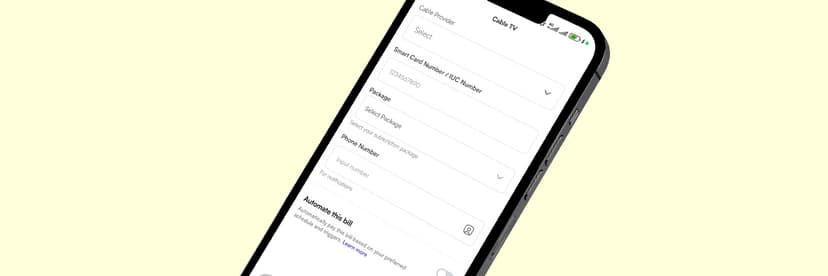
8. Once done, you’ll see an “Automate this bill” toggle; click it on.
9. After toggling it on, you’ll see a drop-down that reads “Trigger type”; click on it.
10. Next, select how you want the automation to run, either “frequency-based” [set up recurring payments (daily, weekly, monthly)] or by custom order, which is to schedule at a specific “date and time”.
(a) For frequency-based, after you’ve selected it, click the “drop-down" and select how you want the frequency. Do the same for the day of the month you want.
(b) For custom order [date and time], select the date and time of your choice.
11. Finally, after selecting any of the automations of your choice, click "Save” to save your automation.
💡 Note: Don’t click on “continue to payment” if you don’t intend to make any purchase, else you'll be debited.
People Also Read: Subscribe to Your Spectranet Router with Kwikpik
Things to Know About Kwikpik’s MTN Data Purchase
1. You Can Buy for Any MTN Number
Parents buying data for children in school, business owners topping up staff SIMs, people sending data to family members in other states, all of this is possible with just the recipient's phone number. You do not need to be on the same account or have any prior connection to the number.
2. Activation Is Instant
Once a transaction is confirmed, the data lands on the number in seconds. There is no waiting period or manual confirmation required.
3. Your Transaction History Is Saved.
Every purchase is logged in the app, so you always have a record of what you bought, for which number, and when. This is useful for business owners managing multiple lines.
Conclusion
Data should not be something you chase.
It should be something that is always there when you need it.
If you are managing one line or several, buying for yourself or for someone else, the goal is the same, and that’s to always have enough data to stay connected.
Kwikpik makes the whole process easy.
Buy in seconds, automate so you never run out, and keep a clean record of every transaction.
No USSD codes that fail at the wrong moment.
No app that takes forever to load.
Just data, ready when you are.
The next time your data is running low, you will know exactly what to do.
Stop Chasing Data. Let Your Subscription Run Itself
Running out of data is an entirely solvable problem.
With the right app, you buy once for any number, activate in seconds, and set it to renew automatically so the issue simply does not come up again.
That is what Kwikpik does for your data needs.
Download our app today and buy your MTN data in under a minute
And it does not stop at MTN.
Kwikpik works across all major networks in Nigeria.
Even if you or someone you are buying for uses Glo, Airtel, or 9mobile, the same simple process applies.
One app, every network, instant delivery.
Download Kwikpik now and never run out of data again.