

 10 mins read
Are you tired of that sudden, sinking feeling when the fan stops spinning, and the lights go out, realizing you forgot to recharge your prepaid meter?
Or perhaps you’ve settled down for a long-awaited weekend match, only for a "Subscription Expired" message to pop up on your DStv screen right at kickoff.
In Nigeria, bill payment has traditionally been a source of constant, low-level stress.
And for most people, it is still a fully manual process done on the phone, at a shop, or on a banking app, one payment at a time.
It’s a mental tax we’ve simply accepted as part of life.
But it doesn’t have to be that way.
A growing number of savvy individuals are quietly moving their recurring expenses to autopilot, reclaiming their time
In this article, we will break down exactly what bill automation means, services you can actually automate today, and how to set up a system that ensures your lights stay on and your data stays active without you ever lifting a finger.
What Does Bill Automation Mean?
Bill automation simply means setting up your bills to pay themselves at a schedule you choose without you having to remember or do anything manually each time.
An example of it can be like a standing order at the bank, where you instruct your bank to debit a fixed amount to a particular account every month.
Now imagine something like that on your smartphone.
A system that handles different types of bills, at different amounts, on different schedules, and confirms each payment to you.
That is exactly what modern bill automation does.
Instead of logging into an app every month to pay your electricity, cable, or data subscription, you set it up once, fund your wallet, and the system handles the rest.
Your bills go out on time, every time, without you lifting a finger after the initial setup.
Which Bills in Nigeria Can Actually Be Automated?
i. Electricity (Prepaid Meters): EKEDC, IKEDC, AEDC, PHEDC, and others are supported on most fintech platforms. You can set up automatic token purchases so your meter never runs dry. You can schedule it weekly, bi-weekly, or monthly, depending on your consumption pattern.
ii. Cable TV Subscriptions: DSTV and GOtv subscriptions are among the most commonly automated bills in Nigeria. Instead of scrambling to renew before your subscription expires, you set a date, and the system renews it for you automatically.
iii. Internet and Data Subscriptions: Monthly data bundles from MTN, Airtel, Glo, and 9mobile can be automated. Whether you are buying for personal use or topping up multiple SIMs for a small business, the process can run on autopilot.
iv. Airtime Top-Ups: If you have a fixed amount of airtime you use monthly, this too can be scheduled. Great for parents who send airtime to kids, or business owners managing staff communication.
v. Streaming Subscriptions: Services like Showmax that operate in Nigeria can be handled through automated payments, depending on the platform you use.
People Also Read: Pay Electricity Bills With Kwikpik
The Two Ways to Automate Bills in Nigeria
There are two main ways to automate bill payments in Nigeria today.
They are not equal, and understanding the difference will help you make the right choice.
Option 1: Bank Standing Orders (The Old Way)
Nigerian banks have offered standing orders for years.
A standing order instructs your bank to debit a fixed amount from your account and send it to a specified beneficiary at regular intervals.
Some limitations are:
(a) Standing orders are designed for fixed amounts going to the same account. This works for something like rent, but not for utility bills, where the amount may vary.
(b) They do not connect directly to billers like DSTV or EKEDC. The bank simply moves money; it does not know what to do with it.
(c) Failed debits (due to insufficient funds) are often not retried automatically, and you may not even be notified promptly.
(d) Setup is often done at a branch or through formal banking processes, which is sometimes inconvenient.
(e) Often, there are delays in receiving notifications due to the network being bad; some delays take days before reflecting.
Option 2: Fintech Apps Like Kwikpik (The Smarter Way)
This is where things get genuinely useful.
Fintech platforms built for the Nigerian market have closed the gap that banks left open.
Apps like Kwikpik are built specifically to handle recurring bills across many categories, with flexibility that bank standing orders simply cannot offer.
Some use cases are:
(a) They have a large number of supported billers for electricity, cable, data, airtime, and more.
(b) You have flexibility in scheduling, which includes weekly, bi-weekly, and monthly.
(c) Has a fixed amount, which you can also change depending on what you want.
(d) You get instant payment confirmation/alerts through emails and pop-up notifications.
(e) You don’t need to go to an office to set it up; all you need is to download the app, and you’re good to go.
People Also Read: How to Fund Your Kwikpik Wallet
Step-by-Step: Automating Your Bills With Kwikpik
1. Download the Kwikpik app from your Play Store or App Store.
2. Create an account.
3. Once done, on the homescreen, you’ll see all that we offer. Click on any of the bills you want to automate (airtime, data, electricity, cable TV).
4. Let’s assume you selected to buy airtime. The next thing to do is to select the “network, phone number, and amount”.
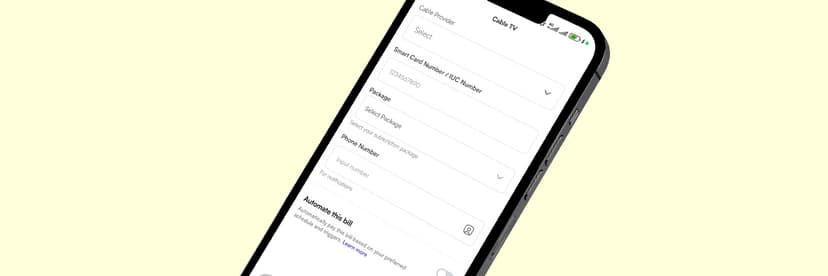
5. Once done, you’ll see an “Automate this bill” toggle; click it on.
6. After toggling it on, you’ll see a drop-down that reads “Trigger type”; click on it.
7. Next, select how you want the automation to run, either “frequency-based” [set up recurring payments (daily, weekly, monthly)] or by custom order, which is to schedule at a specific “date and time”.
(a) For frequency-based, after you’ve selected it, click the “drop-down" and select how you want the frequency. Do the same for the day of the month you want.
(b) For custom order [date and time], select the date and time of your choice.
8. Finally, after selecting any of the automations of your choice, click "Save” to save your automation.
💡 Note: Don’t click on “continue to payment” if you don’t intend to make any purchase, else you'll be debited.
How Much Does It Cost to Automate Bills?
Most bill automation platforms in Nigeria charge a small service fee per transaction.
This is how the platform sustains itself while keeping the app free to download and use.
With Kwikpik, fees are kept low and transparent.
You will always see the fee before confirming any payment, so there are no hidden deductions that catch you off guard.
The fee structure is designed to be affordable, even for users who automate multiple bills.
The Cost of Not Automating Bills
1. A disconnected prepaid meter means buying candles or running a generator, far more expensive than any platform fee. This could get worse if your device is flat and you have to wait for it to charge before powering it up to make a payment.
2. An expired DStv/Cable TV subscription means a boring home, especially having kids around who love watching CoComelon, one of those cartoons that helps you take a break from their disturbance when they are watching it. (Imagine the headache you would have when they start crying just because the DStv expires while they were watching).
3. A missed data renewal means burning mobile data at a higher price when you start buying cheaper data just to get your work done, and by the time you check how much you’ve spent, you’ll realize you’ve spent more than your normal cost, or at worst, borrowing airtime when you don’t have a means to pay back or calling friends to share you data. You might even lose business communication in the process.
- To learn how to borrow airtime on Airtel, click here.
- To learn how to share airtime on Glo, click here.
4. The mental load of tracking multiple bill dates every month is a real cost. It takes time and attention that you could spend elsewhere.
When you add it up, the small fee for automation is almost always less than the cost of the disruptions, reconnection charges, and time lost from managing bills manually.
5 Tips to Make Bill Automation Work for You
1. Always Keep Your Wallet Funded
This is the single most important rule.
Automation only works if there is money in your wallet when the scheduled payment is due.
Make it a habit to check your wallet balance at least a few days before your bills are due to run.
Some platforms also allow you to set a minimum balance alert; if they do, turn that on.
2. Turn On Payment Alerts
Every time an automated bill pays, you should get a notification.
Make sure your app notifications are enabled, and that your registered phone number and email are active.
These alerts are your confirmation that everything went through, and your early warning if something did not.
If you ever receive a failed payment alert, act quickly.
Fund the wallet and manually trigger the payment, or contact the platform's support.
3. Review Your Billers Every Three Months
Your bills are not static.
A subscription you set up eight months ago may have increased in price.
A meter number may have changed.
A service you no longer use may still be running payments.
Set a quarterly reminder to open your automation app and review every active biller.
Update amounts, pause what you no longer need, and add any new recurring bills you may have picked up.
4. Do Not Over-Automate at Once
If you are new to bill automation, start with one or two bills, your most critical ones, like electricity and data.
Get comfortable with how the platform works, understand the alerts and the wallet funding cycle, and then gradually add more billers.
Jumping in with ten bills at once can get overwhelming if something goes wrong and you are still learning the system.
5. Use the Platform's Other Features
Many fintech apps that offer bill automation also come with other useful tools.
Kwikpik, for instance, is a fintech and a logistics platform as well.
With Kwikpik, you can run:
(i) Deliveries (Pickups and drop-offs)
(ii) Food ordering
(iii) A multi-wallet account that lets you hold, move, and use different currencies.
(iv) Get groceries and farm produce straight from the source
(v) A merchant platform that allows you to set up your store once and start receiving orders from customers in your area, with delivery and payments handled for you.
(vi) Live tracking to help you track your deliveries
(vii) It also includes a delivery calculator for logistics needs
All useful if you run a small business and are managing both operational payments and deliveries.
Explore what else the platform can do for you beyond just bill payments.
You may find tools that save you even more time and money.
Conclusion
Bill payment stress is one of those quiet drains on everyday life in Nigeria that most people have simply accepted as normal.
It does not have to be.
Even if you are a working professional managing a busy household, a small business owner keeping multiple accounts running, or a parent sending support to family, bill automation gives you back your time and your peace of mind.
The technology is here.
The platforms are accessible.
And the process, as you have seen, is straightforward enough for anyone to set up.
The Smarter Way to Pay Bills Is to Use Kwikpik Today
The mental load of remembering meter numbers, renewal dates, and wallet balances is a hidden tax on your productivity.
The chill way for you to pay bills today and always is to use Kwikpik, moving your essential services from a "to-do" list to an "already-done" list.
By setting up your automation now, you are buying back your time and eliminating the risk of sudden disconnections.
Join the growing number of Nigerians who have retired the manual way of living and embraced a system that works as hard as they do.
Download the Kwikpik app today by clicking here.